Hi,
I have a linked folder containing several linked standard pages. This means that the folder with the page assets can be found at two places in the asset tree, with two separate web paths.
I want to use a Paint Layout for the pages.
When I apply the Paint Layout for one of the folder it works well.
But when applying to the other folder it doesn't work. The Paint Layout won't get applied to the pages. The process goes well without any error messages. The HIPO process goes through all the pages without applying the layout. There isn't anything in the error.log about the issue either.
But when I apply the paint layout to the pages "manually" it works well.
Anyone with a tip on how this could be fixed? Is it a bug?
[quote]But when I apply the paint layout to the pages “manually” it works well.
[right][post=“12813”]<{POST_SNAPBACK}>[/post][/right][/quote]
What do you mean by this? There is only one way to apply a paint layout, so I’m not sure what this method is. 
What I mean is that when applying the paint layout to the folder it's automatically applied to the children assets.
This doesn't work for one of the linked folder.
Instead I have to "manually" apply the paint layout direct to every child assets, which works well.
But obvious is that this takes a lot longer time to do and new child assets don't get the paint layout applied by automatic.
Paint layouts are applied per URL. Make sure you're applying the layout to correct URL (i.e. all of the URLs) so that it is applied to all locations the folder is linked to.
Hmm..
The folder are linked -> it has two separate urls.
I've applied the paint layout to one of the folder (one of the urls), but I can't apply the second one.
See attached file for the Lookup screen of the folder that I cant apply the layout to.
Maybe I'm doing something wrong, but I apply the locks on that screen and choose the paint layout to be added to the one thats saying "None"
Bild_5.png (16.5 KB)
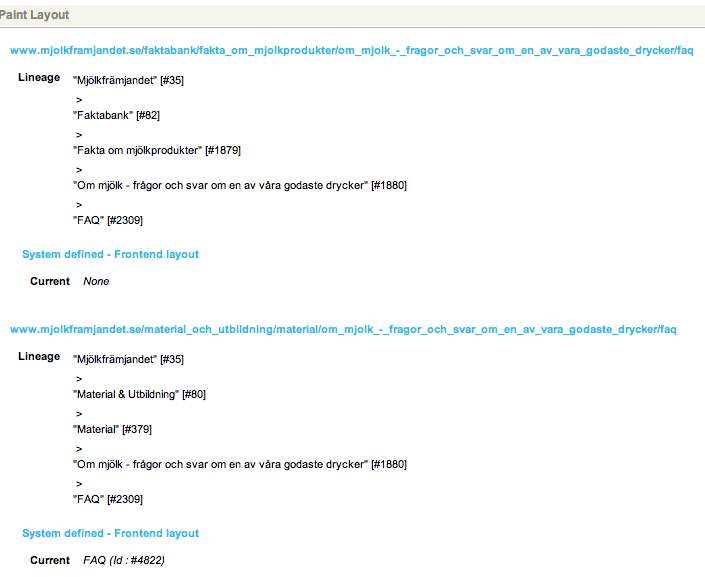
Yeah, it should work. We're going to have to wait for Greg or someone to chime in.
Do you get any errors when you commit? Does the update lookups HIPO job start running? Does it work for other assets with multiple URLs?
Hi,
No errors when committing.
The update lookups HIPO job runs without any problem.
Nothing in the error log.
I tested to link another folder and applied the paint layout to both linked folders without any problems. It worked well.
So it's something special with just the one that won't work.
Now I'd applied the paint layout to the parent asset to the folder and it worked well.
Strange!
I'd be interested to know if it is due to the web path being used. Any chance you can add another folder somewhere with the same web path as this one (obviously the URL itself will be different, but that is probably okay if the parent applied fine) and try applying te paint layout to that one?
If you get a problem with another asset using the same web path, submit a bug with that info and we'll look into it. Otherwise, I think it's going to be very hard to reproduce.
Hi Greg!
I've a test environment where I'm running 3.10.2 and I tried to apply the paint layout there with success.
In the production I still run 3.6.9.
I don't really understand the test you asked me to do. When I add a new folder at the path as the one that didn't work it will get the layout applied as it's inherited. I add the folder as a sibling to the FAQ folder in the structure.
Check the attached snapshot earlier. The FAQ asset is the folder I tried to apply the layout to. That folder is a child to "Om mjölk…" which also is linked. So the complete structure is linked:
    "Om mjölk..."
    |
    |----FAQ
           |
           |----Standard pages
Sorry, what I meant was:
Add a folder somewhere else in the system and give it the same web path on it's Web Paths screen. By being somewhere else, it won't inherit the paint layout you want to apply to the broken folder.
Now try and apply the paint layout to the new folder.
What this may tell us is if having this particular web path is stopping paint layouts from being applied.
However, from your comments and a little more thought, I don't think the web path is the problem. There must be something else going on.
Maybe try changing the web path of the problem folder and try applying the paint layout then. This will force the update lookups HIPO to run and update that folder's URLs, which may fix something up.