We've just become aware of a problem with search pages on our system. We're running 4.8.2.
When we visit the details screen of a search page we get a PHP error referring to the new 'Hide Unlinked Navigational Text' feature.
[attachment=547:search-error.png]
Also see the backtrace text:
[attachment=549:search-backtrace.txt]
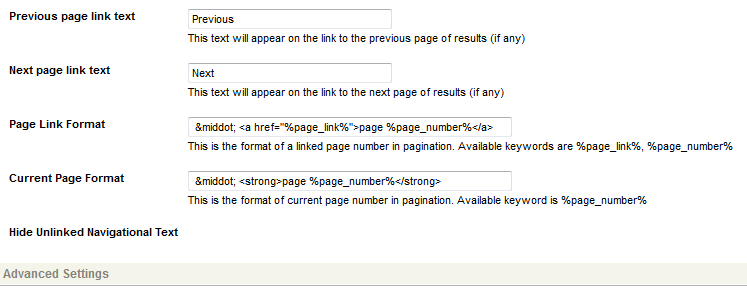
Scrolling down the search page to the 'Hide Unlinked Navigational Text' option under Display Options, it just has the field label and a blank space where the option(s) should be.
[attachment=548:search-hide-unlinked.png]
Additionally (and it may or may not be related), I can successfully acquire the lock on the search page in Firefox 12, but when I try to do the same in IE9 it stalls every time - I have to go into the HIPO Herder and resume the job in order to acquire the lock.
Another thing I should point out is that we look after our own server - my manager typically takes care of the upgrades. He used the scripts, as usual, to perform the most recent upgrade, so we wouldn't have thought we've done anything to cause this issue…
Does this look like a bug?
Thanks,
Margaret
search-error.png (3.43 KB)
search-hide-unlinked.png (7.69 KB)
search-backtrace.txt (9.54 KB)

[quote]
Does this look like a bug?
[/quote]
Hi Margaret,
It seems like the code was updated but the required installation steps were not run on the system to add this new attribute and its related fields. Can you try to run install/step_02.php, install/step_03.php and install/compile_locale.php and then try to access the search page?
EDIT: Also if this solves the issue there might be issue with the automatic script. Is automatic script what was used to upgrade the system?
Ash
Hi Ash,
Warwick (my manager) did use the automated scripts, but I'll get him to try what you have suggested and let you know the outcome.
Thanks!
Margaret
[quote]
Hi Margaret,
It seems like the code was updated but the required installation steps were not run on the system to add this new attribute and its related fields. Can you try to run install/step_02.php, install/step_03.php and install/compile_locale.php and then try to access the search page?
EDIT: Also if this solves the issue there might be issue with the automatic script. Is automatic script what was used to upgrade the system?
Ash
[/quote]
G'day Ash,
I've run the steps you suggested and it now works fine!
Running the steps did change our install key, which then made the system inform us that it was without warranty. However I just changed the install key back to what it used to be and now that seems fine as well (unless changing the install key causes any other problems that I don't know about?..)
Thanks,
Warwick
[quote]
G'day Ash,
I've run the steps you suggested and it now works fine!
Running the steps did change our install key, which then made the system inform us that it was without warranty. However I just changed the install key back to what it used to be and now that seems fine as well (unless changing the install key causes any other problems that I don't know about?..)
Thanks,
Warwick
[/quote]
Hi Warwick,
Thanks for confirming that the running the installation steps fixed the issue. this helps when someone else with similar problem stumbles on this forum post and also for us to see what might have gone wrong initially.
As for changing the install key back to what it was originally, I don't think that should cause any issues.
Ash