Simple Edit: layout examples

Hi,
I was asked by a forum member so I thought I might as well share my experiences with everyone. Bear in mind as I post this, we are not live and the exposure to simple edit users has been minimal, their feedback may change things.


  • We have decided to not use the keyword to change screens (javascript/drop down) and create our own CSS tabbed interface which seemed more flexible.
  • I was hoping to keep all simple edit related things inside the layouts as single point of control, unfortunately some keywords (asset url) are available only in the design.
  • We are using 4 layouts currently applied only to Page Standard. Each layout is made of two content area: the navigation one, common to all 4 layouts apart from a class, and the screen-specific keywords.


    Design area

    In our design area we have the following code just above the 'body' design area:


Page title:
(/_nocache" target="_new">Preview in a new window)


which results in the following:

[quote]Page Title: My page Title

http: //mydomain.com/my_page (preview)[/quote]


Navigation Content (common to all layout)

That's probably the funkiest (designed long ago now, so maybe out of fashion).


The DIV containing this content has ID set to "cmsscreenmenu".

And of course, the 'class="selected"' is placed in a different <a> according to which tab needs to be highlighted.


I've attached the CSS which makes the above list inline and tab-like (I hope it works for you, there may be more style involved which i forgot to attach).


Detail screen

    Current status: %details-F_status_current%
    Change status: %details-F_status_change%
    %commit_button%

Content screen

    %__custom-contents%
    %commit_button%

Metadata screen

    %metadata-F_metadata_values%
    %metadata-F_metadata_instructions%
    %commit_button%

Workflow screen

    %workflow-F_workflow_metadata_warning%
    %workflow-F_workflow_status_change%
    %workflow-F_workflow_log_message%
    %workflow-F_workflow_status_commit%
    %workflow-F_workflow_report%


[b]Important facts:[/b]
- We would really like to hide (using CSS) the cascade checkbox for status and for workflow because in simple edit it causes chaos (content going into approved to go live when page hasn't started the workflow, etc...). Unfortunately it is not easy because the source produced by Matrix isn't using any id we can simply hide. Hiding the checkbox is doable, however the text following the checkbox cannot be removed easily.

Attached is the resulting look of our simple edit.
I would love to see what else people have done.
(sorry for the long post)
Cheers. simpleedit.css (1.06 KB) simple_edit.jpg (25.8 KB)

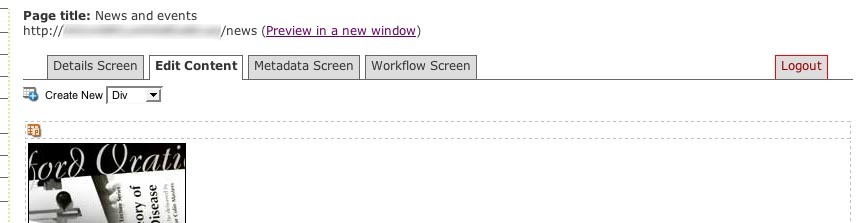
I must say that is a nice way of doing it… I do like the tabbed option… I assume you include with your simple edit conditional to include the simple edit CSS, so its not loaded on every page when not needed?


Have you attempted adding layouts to binary files like PDF, MS Documents etc?

No, but it could be done (and probably should).


[quote]Have you attempted adding layouts to binary files like PDF, MS Documents[/quote]

No, the ability to edit PDF and MS Document in simple edit is fairly recent and therefore we haven't thought about it yet. It will probably be required soon though.


Another very recent addition is the 'release-lock-in-simple-edit' keyword (never played with it, only read it in the changelog).

I wonder whether something can be done with a javascript onunload() event to automatically release locks upon leaving a screen. Anybody tried it?

[quote]No, the ability to edit PDF and MS Document in simple edit is fairly recent and therefore we haven’t thought about it yet. It will probably be required soon though.


Another very recent addition is the ‘release-lock-in-simple-edit’ keyword (never played with it, only read it in the changelog).

I wonder whether something can be done with a javascript onunload() event to automatically release  locks upon leaving a screen. Anybody tried it?

[right][post=“12139”]<{POST_SNAPBACK}>[/post][/right][/quote]


Cool sounds good. do you mind if we use your tab format and expand a little on it to suit our needs? like how it looks and how it makes it easier to move through the screens rather than the dropdown…


Also are the only screens available edit content, workflow, metadata and details?? have anymore been exposed at all… (question for the squiz reps??)

Reuse?
Go for it that's why I shared it.

Improve?

Even better, if you could share the improvement back through the forum that would be ace.


In terms of screens available, the keywords available are going to be your only restriction. With the new keyword manual, there may be better ways to split functionality. The one that needs to be kept separate I believe is the workflow because of the not so standard commit button, but as you said Squiz reps are better informed and probably more up-to-date on that.

I guess I am really out of the loop, or am just too new to Matrix. I am having a hard time understanding how I would use this with my users. What sort of things would be on the details, metadata and workflow screens? I guess that I was only thinking of having an edit content window for me users, and was not thinking about anything else. Help me expand my ideas on this.

Well, the Details screen is there to allow users to change the Status of an asset. Workflow is there to allow workflow approvals to occur in Simple Edit (so that your approvers do not need to be trained to use the Administration Interface) and Metadata is available for any custom information you might need for each asset, like Dublin Core or EdNA metadata.

Wow, I am finally starting to see how this could be extreamly valuble to me. I have been having a problem, not wanting my users to even have to access the admin interface, it can be confusing and not nessissary for most of my users. Is it possible to create new pages in the simple edit interface, be creating some custom layout?

[quote]Is it possible to create new pages in the simple edit interface, be creating some custom layout?
[right][post=“12198”]<{POST_SNAPBACK}>[/post][/right][/quote]


It is, but you use the Asset Builder asset. The Asset Builder allows you to create new assets from the Frontend according to your preconfigured requirements.

I can't find a "Contents" screen. Am I doing this right? In the Layout Manager. I add a new Layout, select "Design" from drop-down. Add a new screen, I find Details, Metadata, ect, but no "Contents". Have I added the wrong layout?

I'm not sure you can edit a Design from Simple Edit. You need to add Layouts for Standard Page and other front-end assets.

I had this working perfectly, until I made the upgrade to 3.10.2 I think something changed in the way of the Layout manager and custom layouts for the Simple Edit Mode. When I am in the simple edit mode, and I click on my different tabs, to go to "metadata" for example, but then open the same window in itself, and continues to do some for as many times as you click, and it never takes you to the correct tab.


I have included a screen shot so you can see. Avi, and help with this? Was the code changed, so that I need to tweek my code to make this work?


The code was changed, because of the excessive amounts of redirects that were previously used. I'll point the developer at this thread so that they can let us know how to overcome this issue.

There were some changes made to the simple edit in 3.10.2.
In order to fix the problem, you will have to change


to


i.e. add '&SQ_BACKEND_PAGE=main' in the query string.
This will be fixed in the next release, so that you don't have to specify SQ_BACKEND_PAGE.

Related bug fix 1770

You'd want to use &amp; instead of just & for compliance, btw. :slight_smile:

Thanks for sharing this post,
I'm having a bit of problem following where to put the keywords for each of the TAB.

This is what I have done.


  • Create a New Design


  • Apply the NEW Design to a standard page


  • Preview the Standard page


    I see the tabbs, but when I click on it nothing happens.


    Do I need to create each tabb section on a seperate Standard Page with their unique keywords? or is part of the design? HAVE I MISSED A STEP Somewhere?


    cheers

You first have to create a new layout for each section. E.g. Desgin, Metadata, ect. You then add the code for the tabs that are provided in this post. Then you use the layout manager, which is in System Management to link those new layouts that you just created. Make sure that when you are in the Layout manager that you edit the layouts for a "Standard Page". Then just add your various screens to the layout manager, and then link your layout files with the corisponding screen.


Hope that helps. Follow the instructions carefully on this post, they do make sense.

Thanks Rayn, that fixed the problem. So are you saying this is going to change again in the next update, and I will have to change my code again? Is there a way to give us a heads up before changes like this are made? If my site was in production, it could have caused some big problems for people using the Simple Edit Interface.


Avi, using the &amp; is not nessissary if using Tidy, correct? I just used a & and in the code it renders it as a &amp;. Just checking.

You will not have to change your code again. The fix Rayn put in is to add support back in for the way you were doing it, which was removed from the last release.