Hey People
Please let us know of any issues you may be experiencing with EES Phase 2 (build 681 for MSM 3.28.3+, released 8 Sept 2010) and we will make every attempt to keep the following list up to date so you don't have to go looking. In some cases we may have to provide bug fixes straight away but for the majority of issues they will be addressed as a part of EES phase 3.
Hi All,
I just updated my test system with this. I really like EES, but we have a problem with it stalling HIPO's and were hoping that this new version would fix the problem, but it hasnt - on my test server at least, we havent put it on our main system yet.
There is an 'Aquire Locks' job that gets created when you enter _edit mode and sits on 0% until the HIPO is deleted via the backend. This creates a new stalled HIPO for every page I try to edit, and if the HIPO is not deleted I cannot go back into EES.
Any ideas? I also just updated my test matrix to 3.28.4
Andrew
Hey ak10
We had this issue when first starting out with EES and the labs team fixed it for us, which went into the 3.28.0 release.
I'll poke a few people to suss it out, but I 'think' it was related to the new way we were using the exit design area and the 'stripping' of the framesets. Can I confirm that your EES Design file has No frames in Simple Edit Interface set to Yes on its 'details' screen?
We have not seen this issue on any other client installs since first dicovering it prior to phase 1 release.
Hi Scott,
Thanks for that, it was set to NO…works like a charm now 
I really must learn to read instructions properly.
Andrew
[quote]
Thanks for that, it was set to NO…works like a charm now
Andrew
[/quote]
Thought it was frames related 
hi - i've managed to get EES2 working on our test server running 3.28.4
the only issue is on preview (page) - i'm getting a frame just below the top edit nav that's about 30 pixels tall (i can scroll and see the page but would like to fix this height issue)
same thing using IE or Firefox (on XP).
No frames in Simple Edit Interface set to YES for the design of the site
all other functionality works - just previewing pages the problem.
any thoughts?
i am already using jquery in my design (perhaps a conflict with the jquery in the editor)?
[quote]
the only issue is on preview (page) - i'm getting a frame just below the top edit nav that's about 30 pixels tall (i can scroll and see the page but would like to fix this height issue)
[/quote]
Hey Bruce
Please see http://forums.matrix.squiz.net/index.php?showtopic=7405&st=15, post by me to Duncan, posted 24 August 2010 - 10:56 AM. This is Design related, you can try the quick CSS fix I posted in there.
thanks for the quick reply scott - i implemented the custom css option but had to hard code 600px instead of 100% for the height - works okay now
another smallish problem - on the wysiwyg editor every button works except: linking, tables, images - i know these use popups and i have popups enabled on my browser.
popup issue fixed itself - must have been a logout/login issue…
also - great tutorial in the manuals on CSS customisation - is there anyway to restricted the create icons as well? whenever i use firebug it tries to select the CSS behind the create asset popups.
[quote]
also - great tutorial in the manuals on CSS customisation - is there anyway to restricted the create icons as well? whenever i use firebug it tries to select the CSS behind the create asset popups.
[/quote]
If you mean the asset creation wizard category listings, these are all contained in their own class specific LI so are very easy to target using JS or CSS with something like:
#ees_assetCreationWizardAssetTypes li.ees_categoryGroup_<asset type goes here> where 'asset type goes here' is replaced with asset type as per matrix asset type tree names e.g.
Standard page would be #ees_assetCreationWizardAssetTypes li.ees_categoryGroup_page_standard
News item would be #ees_assetCreationWizardAssetTypes li.ees_categoryGroup_news_item
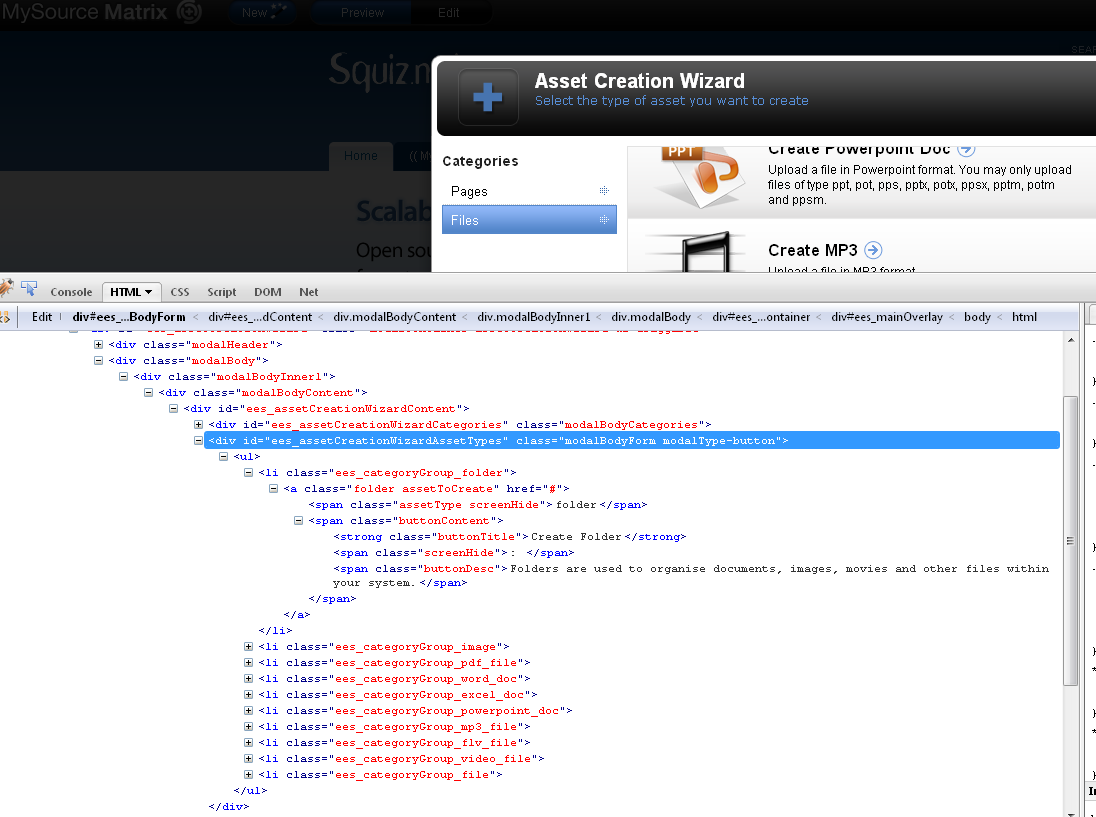
See screeny for dom structure example.
[attachment=481:creationwizard-dom-structure.png]
creationwizard-dom-structure.png (57.3 KB)
I've been playing around with EES some more, and everything seems to be fine.
My question is around adding bits to it - not plugins but new asset wizards. I've found, by looking in the source code, that building a wizard is pretty easy. So I copied the page_standard code, made some changes and now have it creating a page and, using triggers, applying metadata schema's, paint layouts and designs. Basically an asset builder, but a pretty looking one
Is this something that you have plans to document and allow us to create extra assets using EES, and is this something that may change in future releases?
Andrew
[quote]
Is this something that you have plans to document and allow us to create extra assets using EES, and is this something that may change in future releases?
[/quote]
It's great you have been able to figure this out on your own, goes to show some of what we are doing can be understood .
We don't support nor do we advocate adding/changing the core code due to potential upgrade conflicts so you won't see any documentation from us on how to do so, hence the CSS and JS Plugin manuals pages, we're trying to steer people away from touching the packaged files completely. Having said that, there will be plenty of people (uber clients/users like yourself and squiz implementers) who can't/won't wait for future releases for it to do things like create/edit callendar events etc and will be looking for creative ways to add on and/or modify what EES can do.
The best thing to do in such cases is develop with the knowledge that future upgrades may break your changes/additions and try to develop your 'add ons' in a way that are iscolated and can easily be re-applied/tweaked when installing fresh packages. the beauty of EES is that if you muck it all up, you can just delete the folder and install a fresh one. Document everything you do, because its highly likely future releases may break your custom work.
If you're able to dev something that can be re-used by everyone with min to no impact on core files, there is nothing stopping you from submitting it to us for review and inclusion to next release(s) or posting to a squiz community website about how you did it - share the love I say
I'll see if I can put something together.
On the plugin's side of things, the trigger event EasyEditScreenLoad only seems to fire once and not when you switch screens. I read the description of this event as it will fire everytime EES loads a screen (content, metadata, etc), but doesnt seem to.
Is it only supposed to fire the once? Or am I missing something?
My test code is:
    EasyEdit.plugins.removeUnwantedOptions = {
    init: function() {
        var self = this;
        EasyEditEventManager.bind('EasyEditScreenLoad', self.removeUnwantedOptions);
    },
    removeUnwantedOptions: function() {
       alert(EasyEditScreens.currentScreenName);
    }
    };
It only alerts 'Details' when you first enter the edit screen. Is this what it is supposed to do?
I wanted to find a way to remove some options from the edit contents screen after it has loaded.
I've committed a fix to our source code that will rectify the issue with the screen load event. It was indeed not being triggered correctly, and it should be available in the next release. That doesn't really help you now, so if you are keen on putting this fix in yourself you can do the following:
Edit file <System Root>/data/public/ees/Libs/components/screens/EasyEditScreens.js line 858, after: "EasyEditComponentsInfoBox.refresh(function(){});" add the following new line:
EasyEditEventManager.trigger('EasyEditScreenLoad');
After adding anything to the source code you will need to re-minify. There is a minification script included in the release. At the command line:
    $ cd /data/public/ees
    $ php Scripts/minify.php ./
Before making any changes I'd suggest taking a backup.
has anyone come across the message:
http://blah/page is not a valid URL
when using easy edit? im getting a red circle with a white cross as the graphic when trying to edit a page.
and a js error (IE): Exception thrown and not caught
the url is set everywhere i can think (js/css files). the site obviously responds to the right url when viewing.
Hey Bruce
What error appears in the the FireBug console?
not much. ive got past the problem (i hope) - i had set only https in apache to respond to the domain in question - seems you need to cater for both http/https even if you dont use http.
Have you got any hints for improving asset finder performance? The first call of getChildren takes around 30s to run on our system, and returns 136.5 KB of json :ph34r:, we do have a pretty big tree - 140 kids under the site asset.
136kb does sound like quite a bit. The only solution I can find to get this working faster for you is to override some of the caching settings used by the asset finder so consecutive calls to the asset finder on the same page will use cached information. The plugin example:
    EasyEdit.plugins.assetFinderCustomCache = {
    init: function() {
        var self = this;

        // Add a function to the screen load event
        EasyEditEventManager.bind('EasyEditAfterLoad',self.setCaching);
    },
    setCaching: function(){

        // Set a custom cache expiry for all EES functions that use
        // caching
        var expiry = 10*60; // 10 minutes (expressed in seconds)
        EasyEditCacheManager.timeout = expiry;

        // Overload the _cleanUp function with a custom one
        EasyEditAssetFinder._cleanUp = function(){
            // Restore the default functions, but don't clear cache
            jQuery('body').removeClass('doubleOverlay');
            jQuery('#ees_assetFinderOverlay').remove();
        };
    }
    };
To get this working with the asset finders 'auto browse' feature you will have to patch the EasyEditAssetFinder.js file found in the core code base (and re-minify afterwards). Line 500 of this file should have a line added:
    // After self.options.buttonCollection.show();
    // add the following line:
    callback.call(this);
Core EES code has been patched to reflect this bug fix, but won't be available until the next release.
We may add features to allow you more control over caching in configuration in future releases, so this would only be a 'stop gap' fix.
[quote]
136kb does sound like quite a bit. The only solution I can find to get this working faster for you is to override some of the caching settings used by the asset finder so consecutive calls to the asset finder on the same page will use cached information. The plugin example:
    EasyEdit.plugins.assetFinderCustomCache = {
    init: function() {
        var self = this;

        // Add a function to the screen load event
        EasyEditEventManager.bind('EasyEditAfterLoad',self.setCaching);
    },
    setCaching: function(){

        // Set a custom cache expiry for all EES functions that use
        // caching
        var expiry = 10*60; // 10 minutes (expressed in seconds)
        EasyEditCacheManager.timeout = expiry;

        // Overload the _cleanUp function with a custom one
        EasyEditAssetFinder._cleanUp = function(){
            // Restore the default functions, but don't clear cache
            jQuery('body').removeClass('doubleOverlay');
            jQuery('#ees_assetFinderOverlay').remove();
        };
    }
    };
To get this working with the asset finders 'auto browse' feature you will have to patch the EasyEditAssetFinder.js file found in the core code base (and re-minify afterwards). Line 500 of this file should have a line added:
    // After self.options.buttonCollection.show();
    // add the following line:
    callback.call(this);
Core EES code has been patched to reflect this bug fix, but won't be available until the next release.
We may add features to allow you more control over caching in configuration in future releases, so this would only be a 'stop gap' fix.
[/quote]
Sweet, that's got it down to under 10s, thanks. I really look forward to seeing what you come up with!